Heroku Node.js Buildpack with a Java JDK
A fork of Heroku's 2014 Node.js buildpack that also installs a JDK, so a Node.js application can run Java programs. Fixed in 2026.
A fork of Heroku's buildpack as it was in 2014, fixed in 2026 but not tested on a current stack. Today the official JVM buildpack in front of the Node.js one does the same, with no fork.
A Node.js application that runs Java programs needs a JDK (Java Development Kit) in its slug. In 2014 the Node.js buildpack had no reason to install one, and an application could only have one buildpack. This fork installs a JDK during the build and puts java on the PATH, for the build and for the running application.
How it works
bin/compile is upstream's Node.js buildpack of September 2014 with three changes. After node is installed, it downloads Heroku's JVM buildpack (release v187, pinned by its SHA-256) into a directory of its own and runs that buildpack's bin/compile on the same build, cache and environment directories. The JVM buildpack installs the JDK that java.runtime.version in system.properties names into .jdk, and writes .profile.d/jvmcommon.sh, which puts java on the PATH when the dyno starts. It also leaves an export file, which the build sources, so java is on the PATH for npm install and its scripts as well.
The other two changes replace services the 2014 buildpack depended on. The node version in engines.node is resolved against nodejs.org's own release index, and node is downloaded from nodejs.org and checked against the SHA-256 sums published with the release. The resolver handles exact versions, x-ranges, ^ and ~, and takes the newest release that matches. Run against the index on 29 October 2026:
| engines.node | Resolves to |
|---|---|
absent, * | 26.13.0, the latest LTS release |
22.x, 22 | 22.23.4 |
^20.1.0 | 20.20.2 |
~18.17.0 | 18.17.1 |
0.10.x, 0.10 | 0.10.48 |
0.10.32 | 0.10.32 |
>=0.10 | 26.13.0, with a warning that the range is not supported |
99.x | nothing: the build stops with an error |
History
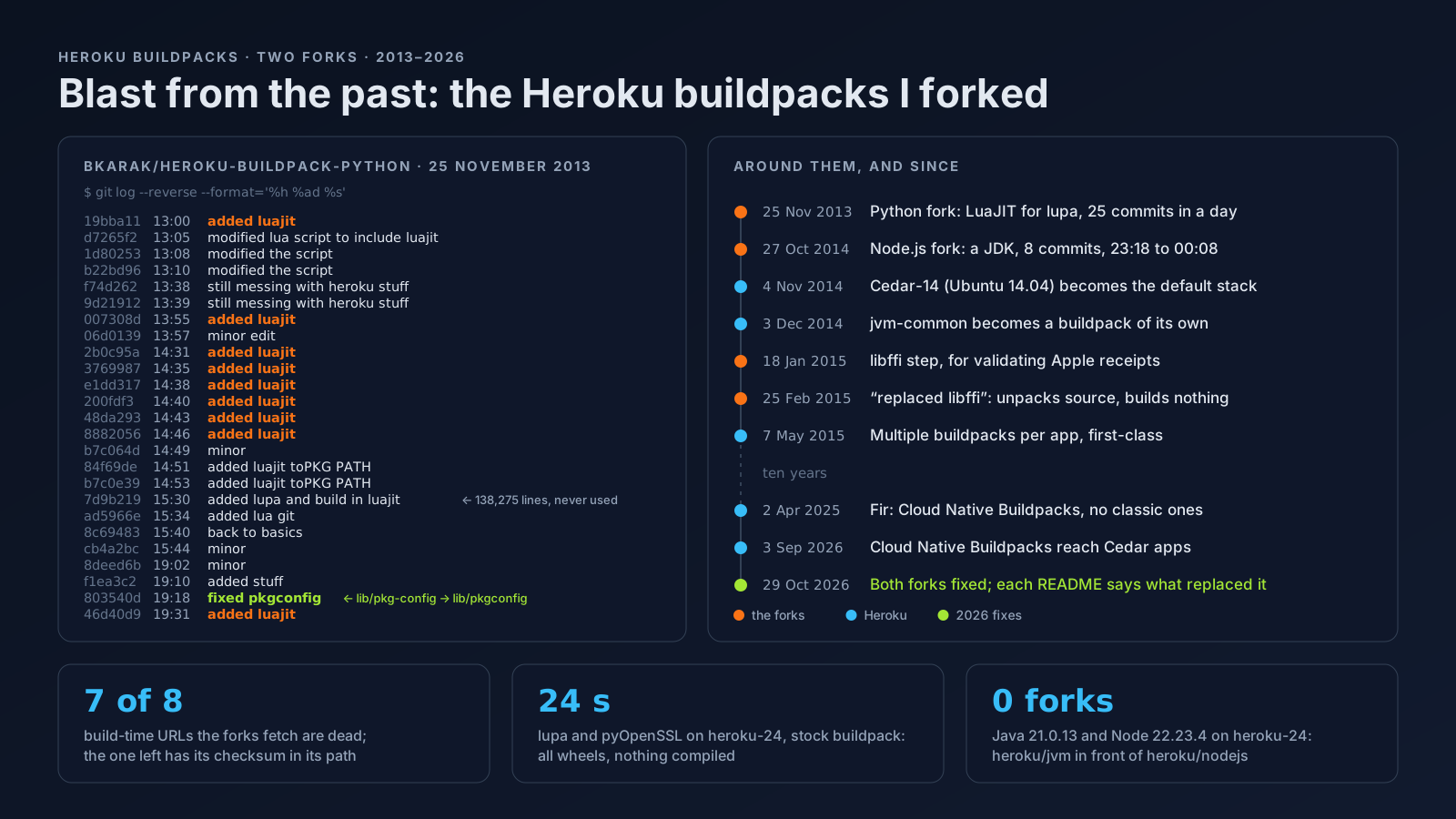
- 27 October 2014, 23:18 to 00:08. Eight commits and a final diff of 14 lines. Heroku's JVM buildpacks shared a library,
jvm-buildpack-common, published as a tarball on S3 and not usable as a buildpack on its own; its detect script said “Not for use as a primary buildpack.” The fork sourced it into the Node.js build, asked it for Java 1.8 (its default was still 1.6) and added/app/.jdk/binto thePATH. - 3 December 2014. jvm-common got a
compile, adetectand areleaseof its own: what this fork did became a buildpack. On 7 May 2015 Heroku gave multiple buildpacks per application first-class support, and the reason for the fork was gone. - 29 October 2026. Fixed, as below.
Fixed in 2026
- The 2014 version unpacked the JVM library into the application's own directory, so its scripts shipped in every slug (and would have overwritten an application file with the same name). The JVM buildpack now runs from a temporary directory, so its own scripts no longer end up in the slug.
- The JDK version comes from
system.properties, not a hard-coded 1.8, and the build log names it (the 2014 status line said “Installing OpenJDK ...”, before the version was known). - semver.io, which the 2014 buildpack asked for the node version, and Heroku's S3 mirror of nodejs.org, which it downloaded node from, no longer resolve. Both are replaced by nodejs.org itself, with a checksum.
- The 2014 buildpack also posted each application's
package.jsonto a Heroku service, nomnom.heroku.com, which no longer resolves either. That call is gone.
Everything else (npm install, the node_modules cache, the default Procfile) is the 2014 Node.js buildpack, and the fork has not been tested on a current Heroku stack.
Today
No fork is needed. Put java.runtime.version=21 (or the version you need) in system.properties, and add the JVM buildpack in front of the Node.js one:
heroku buildpacks:set heroku/nodejs
heroku buildpacks:add --index 1 heroku/jvm
On heroku-24, in October 2026, the build log and a small application that calls java -version from node printed (trimmed):
-----> Installing Azul Zulu OpenJDK 21.0.13
       Downloading and installing node 22.23.4...
node v22.23.4
java -version (from node): openjdk version "21.0.13" 2026-10-20 LTS
java on PATH: /app/.jdk/bin/java
Source
From the post