OSS, the Operating System Simulator
A scheduler simulator written in Delphi for a 1998 operating-systems course, reverse-engineered from its executable in 2026 and running again in the browser.
OSS simulates the part of an operating system that decides who gets the processor. You log in, choose a scheduler (FIFO, round robin or shortest job first) and type commands that write to a simulated screen, memory, hard disk and printer. Each command costs a number of time quanta, and the scheduler hands out one quantum per tick of a 100 ms clock, so you can watch three algorithms disagree about the same workload. It was written in Delphi for Operating Systems I at the University of Piraeus, in January 1998, by a team of six students; the About box credits Renegade and EmP, which is me (under the handle I used then) and Elias Polychronopoulos. The source was lost long ago. In October 2026 the executable was reverse-engineered and the program rebuilt in JavaScript, and that is what runs below.
- scr hello
- prints on the Screen, 5 quanta later
- prn a long job
- 500 quanta on the Printer
- cmp /abc /abd
- which string is higher, in 1 quantum
- stm 5 something
- memory position 5 (the Memory button shows it)
- dirtasks
- the task table, right now
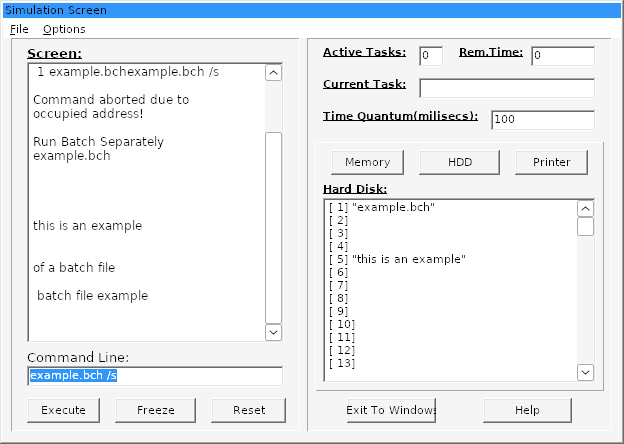
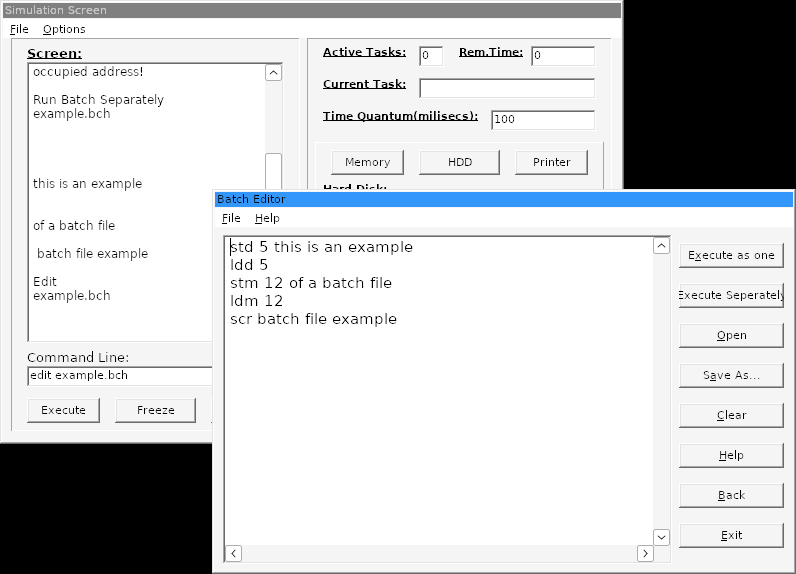
- edit example.bch
- the batch file the program shipped with
How it works
Everything you type becomes a task in a table of a hundred, numbered in the order you typed it. The clock ticks once per time quantum (the field on the right, in milliseconds, which you can change), and on every tick the scheduler picks one task and takes one quantum off it. When a task reaches zero it does what it says: the text appears on the Screen, the Printer panel says "printing completed", the Memory or HDD listing changes. Active Tasks, Current Task and Rem.Time show what the processor is doing.
| Command | Quanta | What it does |
|---|---|---|
scr <text> | 5 | Prints the text on the Screen |
prn <text> | 500 | Sends it to the printer |
stm <N> <text>, ldm <N>, dlm <N> | 1 | Store, load and delete memory position N (1 to 100) |
std <N> <text>, ldd <N>, dld <N> | 100 | The same on the hard disk |
cmp /<a> /<b> | 1 | Says which of two strings is higher |
dir | 5 | Lists the batch files stored on the simulated disk |
end | 1 | Logs out |
<name>.bch | 5 + lines | Runs a batch file as one task, its lines one after the other |
<name>.bch /s | 5 | Runs it as one task per line, as if each were typed |
dirtasks, dirreal, terminate <N>, edit <name>.bch | 0 | The task table, the batch files you have saved, kill task N, the batch editor |
FIFO always runs the oldest task, so commands finish in the order you gave them. Round robin gives each task one quantum in turn. Shortest job first picks the task with the least time left, every tick, so a five-quantum scr typed while a 500-quantum prn is running overtakes it (strictly that is shortest remaining time first, and it is what the original did). Type scr a, prn b and cmp /x /y under each and watch Current Task.
Batch files have one catch, and it is the original's. A batch's text lives in "the real directory" (in this version, your browser's storage), but it only runs if its name is also stored on the simulated hard disk, as the contents of some address: std 1 example.bch, a hundred quanta, and then example.bch. The editor's Execute buttons queue that std for you and put the command on the command line, so pressing Execute straight away tells you the file is "missing from Virtual Hard Drive". Wait for the write. Everything you type is lowercased first, as it was in 1998, and Help opens the manual the team wrote for version 1.2.
Where the browser version came from
The 1998 executable is the only thing that survived, with its WinHelp file and two batch files (the zip below). Claude Code took it apart in one day: the four windows came out of the executable's form resources with every control at its original position, the help file (once its two layers of compression were undone) turned out to be the specification, and the logic was read from the disassembly of the four units, 23 KB of code. Then the original was run under Wine and fed the same commands as the rebuild, line for line. How that went, including the bug the listing hid and the running program found, is the subject of OSS, a scheduler from 1998, reverse engineered.
What is different from 1998
It behaves as the original did, bugs apart. The ones that are fixed, all found in the binary and most of them seen running under Wine:
- Every unknown three-letter command was taken for a batch file ("Specified Batch File Missing from Virtual Hard Drive"), and every unknown six-letter one for a batch with
/s. ldm,ldd,dlmanddldhad no range check.ldm 0printed your login name.- Round robin hung the program at full CPU when
terminateemptied the task table. - The Memory and HDD listings were off by one from address 36 (the file they were loaded from lists
[ 35]twice). - A batch run with
/squeued its first line twice and then overwrote one task with its own empty record; most of the time the two cancelled out. - "occured in line N" counted 128-byte buffers, so every error in a short batch was in line 1, and checking a batch ran its
editandterminatelines. - A malformed
cmpanswered "Equal operands!", commands without parameters echoed the word "none", and a time quantum of 0 stopped the clock.
Changed on purpose: Enter runs a command (the original wanted the Execute button), Ctrl+X quits only outside a text field (it was File > Exit's shortcut and beat Cut), Exit to Windows shows the shutdown screen, and the login window's detection screen shows its text as the help file says it should; the original filled it in a loop that never let Windows paint. The figures on it are what the 1998 program reports on a PC of today, memory capped at 2 GB included.
Source
The engine, the front end, the tests (which replay sessions recorded from the original under Wine), the analysis scripts, the recovered forms and the account of the reverse-engineering are at bkarak/os-simulator (external link, opens in a new tab), under the MIT licence. The 1998 files are not in the repository; they are the oss.zip below.
The 1998 page
Everything from here down is the original page, transcribed as it was written.
This application was originally created by me and Empirian (aka Elias Polichronopoulos) to simulate time-sharing algorithms of a scheduler in a operating system. The application was created as a project for the Operating Systems I class of CS department in UniPi (Jan 1998). It features the way time sharing algorithms function. 3 algorithms are implemented - FIFO , Round Robin and Shortest Job First , and 8 basic commands - including simulated HDD , memory and printer - plus some secondary commands. There is also the ability to create and execute batch files using these commands.
The 1998 program, running under Wine in 2026
Downloads
- oss.zipthe 1998 program, its help file and two batch files
These are the original files, kept as they were published. Most are decades old and are here as a record rather than as working software.